AI & MCP
MCP for project management
The Model Context Protocol (MCP) is the standard that finally lets AI assistants like Claude do project management with you, not just talk about it. This explainer covers what MCP is, why it matters for project tracking, what a project-management MCP server actually exposes, how it differs from Zapier and webhooks, and how teams can adopt it safely.
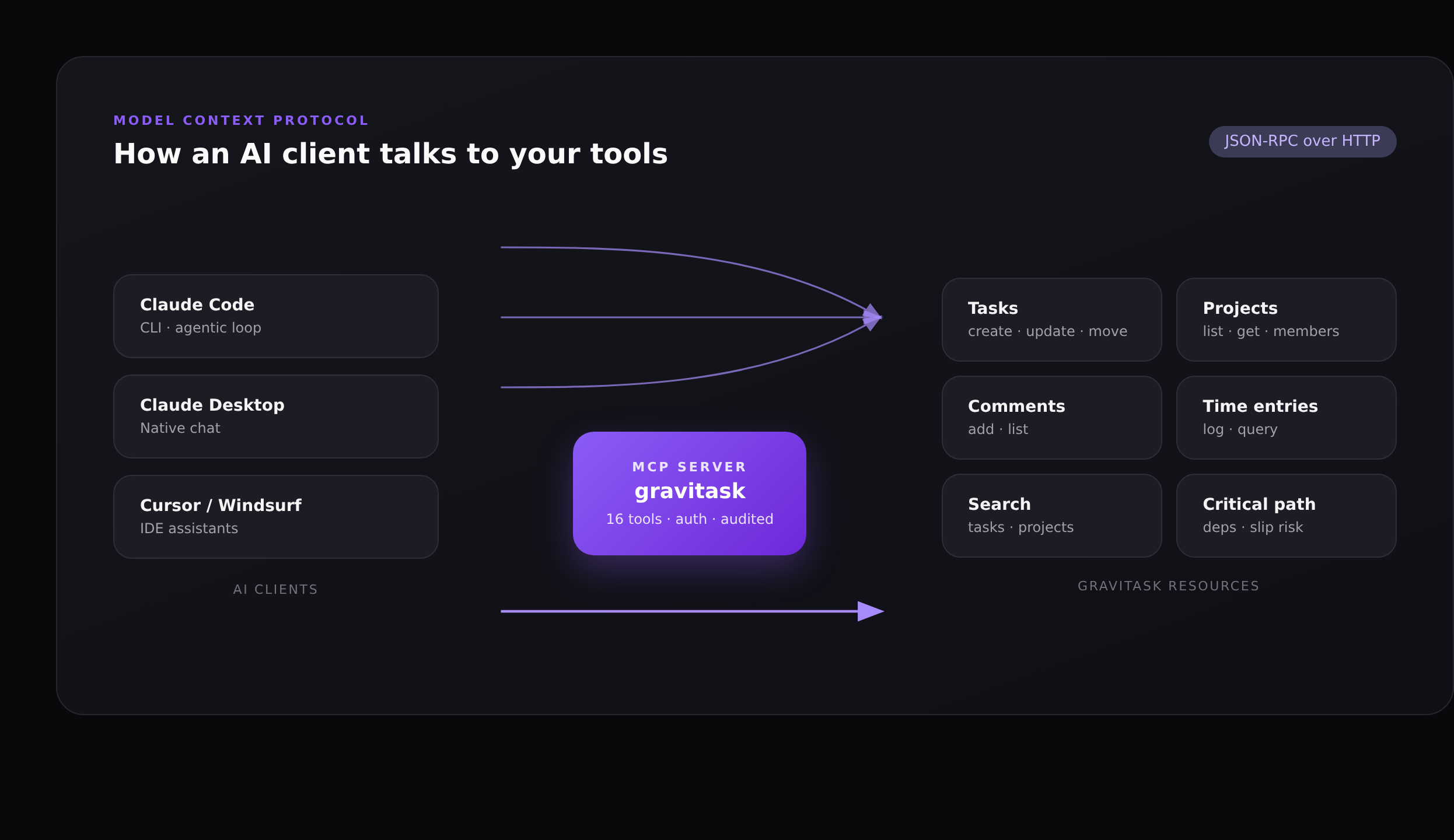
The Model Context Protocol (MCP) is an open standard, originally introduced by Anthropic in late 2024, that lets AI assistants connect to external tools and data through a structured contract. Think of it as a USB port for AI: any client that speaks MCP (Claude, Cursor, Windsurf, Cline, JetBrains assistants, Amazon Q) can plug into any server that exposes one. For project management, that small piece of standardisation is the difference between an AI that talks about your work and an AI that does it.
This article explains what MCP actually is, why it matters specifically for project management, what a project-management MCP server looks like in practice (using Gravitask as the worked example), how it compares to webhooks and Zapier-style automation, and what the security model looks like for teams that need to keep auditors happy.
TL;DR
MCP gives an AI assistant a typed, authenticated, read-and-write API into your project tool. Instead of pasting a status update into chat, you ask the AI to write it; instead of describing a triage policy, you ask the AI to apply it. Gravitask exposes 27 MCP tools across wiki, projects, tasks, comments, time tracking, search, workspace, tags and planning.
What is the Model Context Protocol?
MCP is a small JSON-RPC protocol that defines four primitives: resources (read-only data the model can pull in, like a file or a wiki page), prompts (reusable templates the user can invoke), tools (functions the model can call to do work), and sampling (lets a server ask the client to do an LLM call on its behalf). For project management workflows, the interesting part is tools: the AI can list projects, create tasks, post comments and update statuses, and the server enforces what the AI is allowed to touch.
Crucially, MCP is transport-agnostic and client-agnostic. The same Gravitask MCP server is reachable from Claude Code over HTTPS, from Claude Desktop over stdio, and from a custom Anthropic SDK script over either. There is no vendor lock-in for the AI client, and no per-client integration to maintain on the server side.
Why "Model Context Protocol" and not "AI Plugin API"?
Earlier "plugin" approaches (the old ChatGPT plugin spec, OpenAI function-calling, vendor-specific SDKs) were tied to one model or one client. MCP is an open spec governed in the open: any AI vendor can implement it, any tool vendor can expose one, and the same server works for all of them.
Why MCP matters for project management
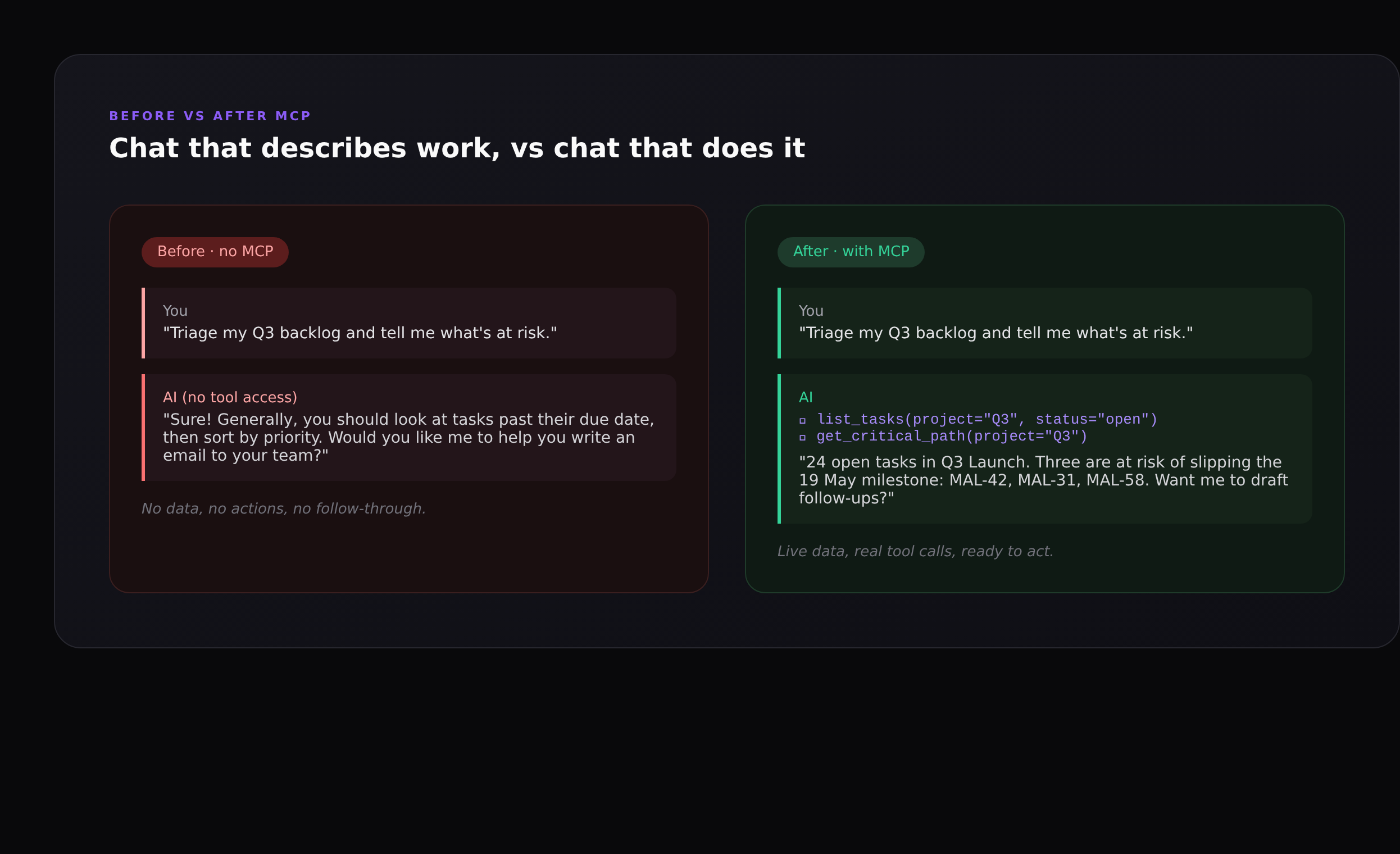
Project management is, structurally, a data problem. Almost every interesting question (what is overdue, who is overloaded, which dependency is about to slip the milestone, what changed since Friday) lives in your project tool, not in the AI’s training data. Until MCP, asking an AI assistant to help with that work meant pasting screenshots into chat and copying its reply back into the tool. The AI was a smart consultant with no access to the file cabinet.
With an MCP server in front of your project tool, three new categories of work become possible:
- Read-and-reason workflows. The AI can answer "which three tasks are most likely to slip Q3 Launch?" by actually pulling the open tasks, the dependency graph, and the historical velocity, instead of guessing.
- Read-write workflows. The AI can not only suggest "you should add a comment chasing this task" but also post the comment, move the task to the right section, and assign it. One sentence, four tool calls, all audited.
- Agentic loops. Because the AI can observe the result of every action it takes, it can plan a multi-step intervention (re-rank the backlog, re-estimate due dates, file follow-ups, post a digest in the wiki) and recover when one step fails.
These are the kinds of workflows we used to wire up by hand using Zapier, custom webhooks, or a sprawling collection of automation rules. MCP collapses all of them into a single conversation surface.
What a project-management MCP server actually exposes
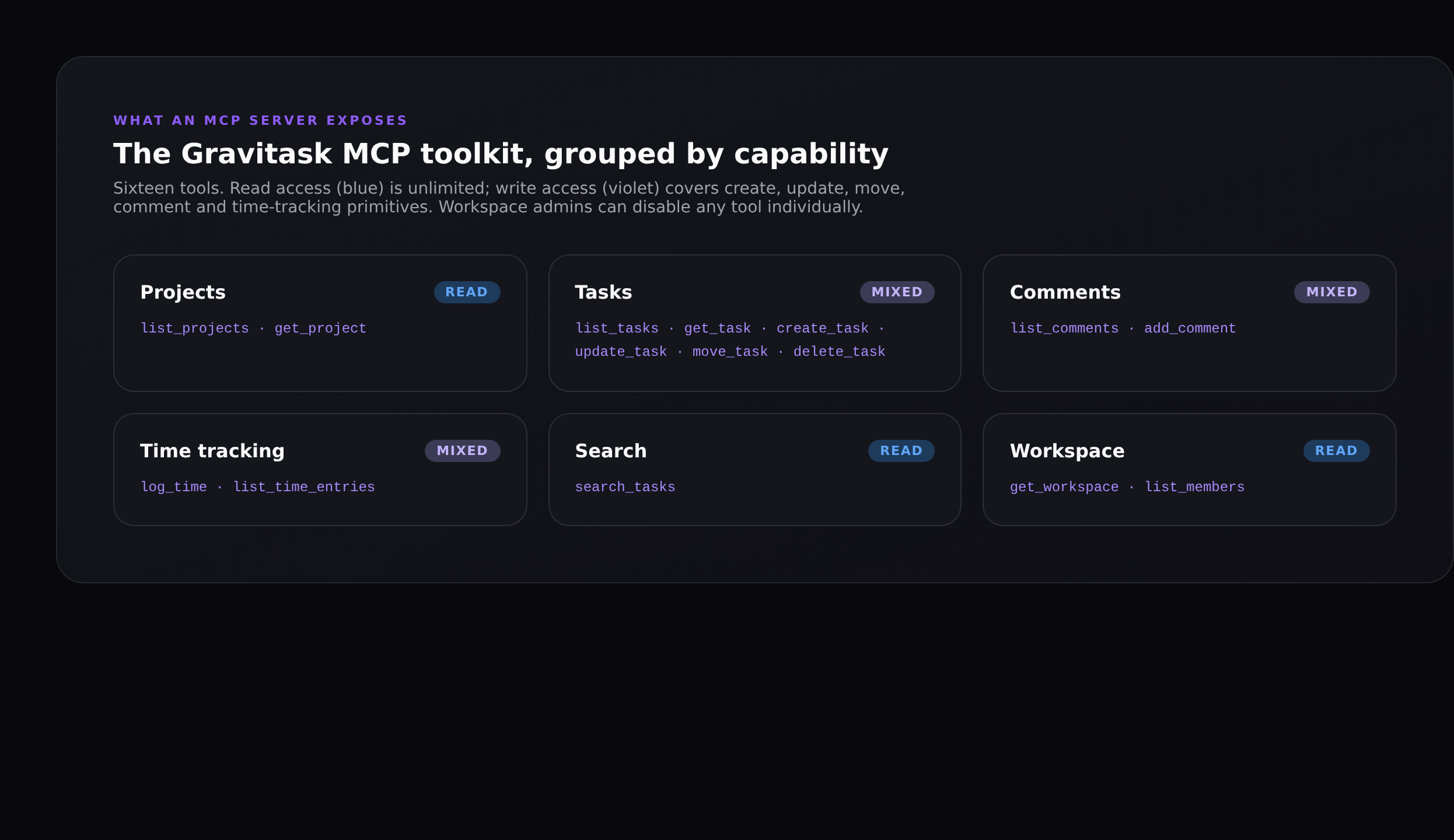
A good project-management MCP server should mirror the primitives of the underlying tool, not just dump the REST API into the model. Gravitask exposes 27 tools, hand-picked to match the things teams actually ask AI to do:
- Wiki (mixed):
list_wiki_pages,search_wiki_pages,get_wiki_page,create_wiki_page,update_wiki_page,verify_wiki_pagefor knowledge work tied to tasks and projects. - Projects (read):
list_projects,get_projectto discover what exists. - Tasks (mixed):
list_tasks,get_task,create_task,update_task,complete_task,move_task,delete_task. The full lifecycle, with task IDs that accept the human-readable short ID (MAL-42) you see in the UI. - Comments (mixed):
list_comments,add_commentfor status nudges and PR linking. - Time tracking (mixed):
log_time,list_time_entriesso the AI can record the hour you just spent in code review. - Search (read):
searchfor the cross-workspace queries you’d otherwise type into the command palette. - Workspace (read):
get_workspace,list_membersso the AI can resolve "who owns this?" and "what plan are we on?" without asking. - Tags and planning (mixed):
list_tags,create_tag,add_tag_to_task,remove_tag_from_task,get_critical_pathfor structured triage and project risk checks.
There is no run_arbitrary_query tool, no escape hatch into raw SQL, and no tool that bypasses the same permission system the UI uses. If a member can’t see a private project in Gravitask, neither can the AI when it’s acting on that member’s key.
How a single MCP exchange flows
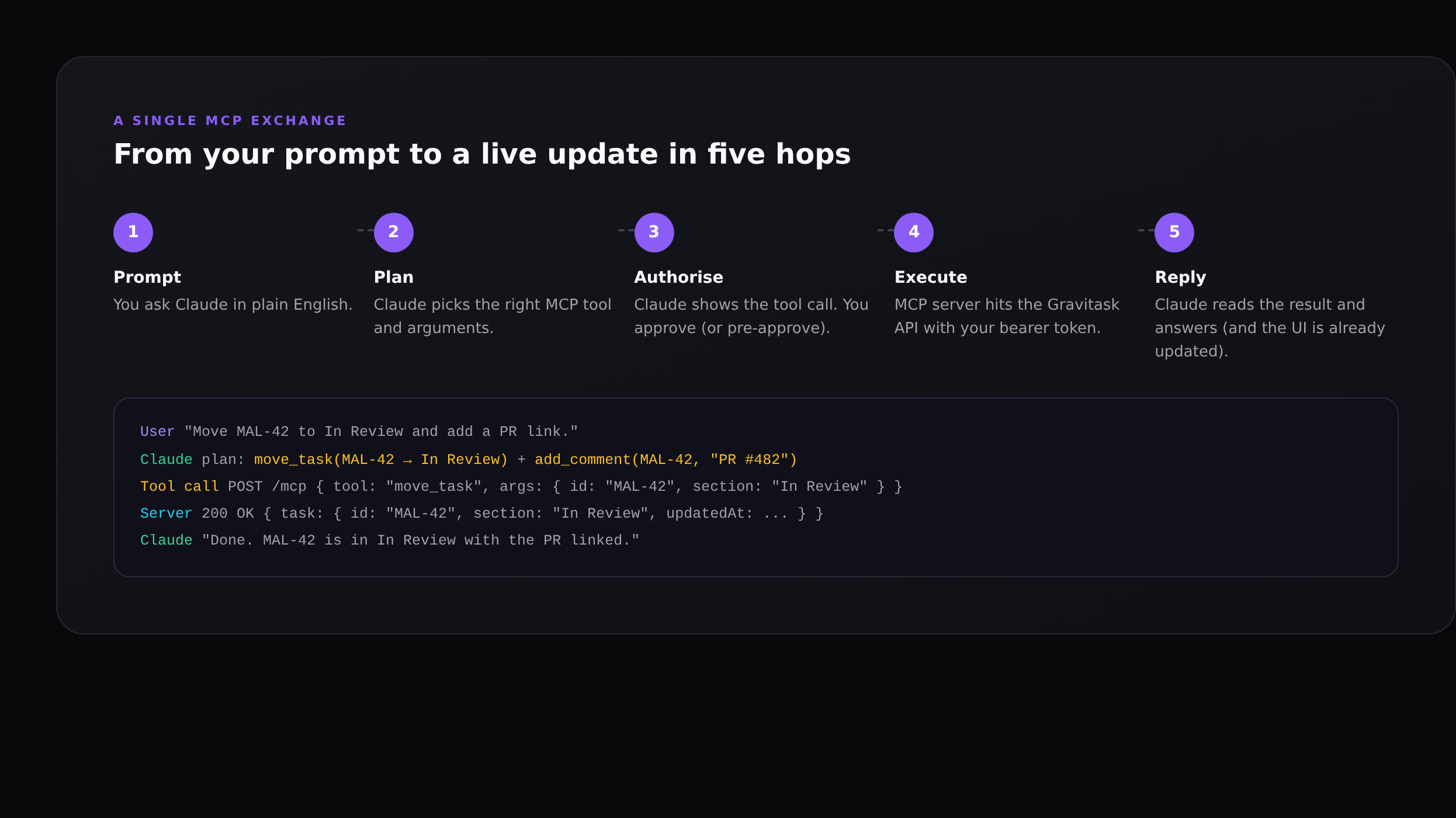
The exchange is deliberately legible: when Claude decides to call move_task, it shows you the call before executing. By default Claude Code (and most MCP clients) require explicit approval for every state-changing tool call. You can pre-approve tools you trust for an entire session if you want a more agentic flow, or keep the default and treat the AI as a thoughtful assistant that always asks first.
Server-side audit trail
Every MCP request hits Gravitask with a bearer token tied to a named API key. The audit log records the key name, the tool called, the arguments and the timestamp. If you ever need to answer "did Claude do this?" or "which integration changed this task?", the answer is one filter away.
MCP vs Zapier, webhooks and RPA
It is fair to ask: I already have Zapier, an automation builder, and a webhook subscription. What does MCP add?
- Zapier and native automations are deterministic. They run when a trigger fires, with parameters you bind in advance. Great for "when a task is moved to Done, post to Slack." Useless when the work needs judgement.
- Webhooks are one-way. They tell external systems that something changed. They don’t let an AI initiate work in your tool.
- RPA tools (UI-driven bots) are brittle: change the layout, break the bot. MCP is API-driven and versioned.
- MCP is open-ended. The AI decides which tool to call, in what order, with what arguments, based on the conversation. The server still enforces who can do what; the AI just brings the planning.
In practice, the right answer is both. Use Gravitask’s built-in automation rules for the deterministic, high-volume work (auto-assign by team, escalate after 3 days, lock the column on Friday). Use MCP for the judgement work that benefits from an LLM: triage, planning, status writing, dependency rewiring, anything where the right next action depends on context the rule engine doesn’t have.
Concrete workflows we’ve seen teams adopt
Sprint triage on Monday morning
A PM opens Claude Code and asks: "Group every open task in the current sprint by priority, then identify the three most likely to slip given last sprint’s velocity." The AI calls list_tasks, get_critical_path and list_time_entries, then writes a short brief naming the three at-risk items and the reason for each.
PR-to-task linking from the terminal
An engineer finishes a PR and asks Claude Code to "find the matching Gravitask task by short ID, move it to In Review, post a comment with the PR link." That is one prompt, three tool calls, and the engineer never opens the project tool.
Friday status digest
A team lead asks for "a Friday update for Q3 Launch grouped by Done / In Progress / Blocked / At risk, with assignee initials and a one-line note for each blocker." Claude pulls the last seven days of activity via MCP and writes a clean Markdown digest ready to drop into Slack or save to the wiki.
Backlog cleanup
A product manager asks Claude to "find tasks in the Bugs project with no activity in the last 60 days, propose archive or close, and ask me to confirm each." The AI returns a numbered list with one-click approval; on confirm it moves them in batches and posts an audit comment.
Security and governance
- Bearer-token auth. Every MCP request carries a workspace-scoped key. Keys are hashed at rest, named for the integration that uses them, and individually revocable.
- Per-tool disable. Workspace admins can disable any individual MCP tool. A common policy is to leave reads on for everyone but restrict writes to a small set of trusted integrations.
- Same permissions as a human user. The AI sees what the key’s owner sees. Private projects stay private; archived workspaces stay archived.
- Full audit trail. Every tool call is logged with the key, tool, arguments, and result. You can answer "what did the AI do this week?" with a single query.
- Rate limits. MCP requests share the same rate budgets as the REST API, so a runaway agent can’t take a workspace down.
A note on prompt injection
Any system that lets an AI act on your data needs to think about prompt injection (untrusted text in a comment or wiki page that tries to override the AI’s instructions). The standard mitigations apply: keep destructive tools behind explicit approval, prefer Read-only keys for unattended jobs, and treat the AI’s plan as untrusted input that you should review before authorising state changes.
Getting started with MCP for project management
If you already use Gravitask, you can connect any MCP-compatible client in under five minutes:
- Generate a workspace API key in Settings → Developer → API & MCP.
- Set
GRAVITASK_API_KEY, then runclaude mcp add-json gravitask '{"type":"http","url":"https://app.gravitask.net/mcp","headers":{"Authorization":"Bearer ${GRAVITASK_API_KEY}"}}'(or use the equivalent config for Claude Desktop, Cursor, Windsurf, VS Code, JetBrains). - Open a session and ask
claude(or your client) "list my projects" to verify the connection.
The full per-client setup, including the JSON config blocks for every supported AI tool, lives on the Gravitask MCP setup guide. For a step-by-step walkthrough of connecting Claude Code specifically (with screenshots and example prompts), see How to connect Claude Code to Gravitask.
FAQ
Is MCP an Anthropic-only standard?+
No. MCP was open-sourced by Anthropic in November 2024 and is now implemented by Claude (Code, Desktop, API), Cursor, Windsurf, Cline, GitHub Copilot in VS Code, JetBrains AI, Amazon Q and a growing list of community clients. The same Gravitask MCP server works with all of them.
Do I need a paid Gravitask plan to use MCP?+
Yes. Pro includes read-only MCP at £5/user/month, while Business includes full read/write MCP at £14/user/month.
How is MCP different from a REST API?+
A REST API is a contract between your code and our servers. MCP is a contract between an AI client and a tool, designed so the AI can discover available actions, get typed parameter schemas, and execute calls. Under the hood, MCP servers usually call the REST API, but they shape the surface for AI consumption.
Does the AI see all of my data?+
Only what the API key can see. Keys are scoped to a workspace, and within that workspace they inherit the permissions of the user who created them. Admins can also disable individual MCP tools (for example, disable delete_task workspace-wide).
Can I write my own MCP server for my own tool?+
Yes. Anthropic publishes official SDKs in TypeScript and Python, plus a reference spec. Most teams start by exposing a few read tools to give the AI context, then add write tools once they have an audit story they’re happy with.
How does MCP coexist with our existing automations?+
They’re complementary. Native automation rules are best for deterministic, high-volume triggers (auto-assign on create, escalate after N days, lock columns at end-of-sprint). MCP is best for judgement-driven work where the AI needs to look at context and decide.
Where to next
If you want to see MCP in your own workflow, the fastest path is the Claude Code setup guide: How to connect Claude Code to Gravitask walks through the whole flow with screenshots. For the broader picture of where AI fits in modern PM workflows, see AI task automation: a practical playbook and the project management tools feature guide.
Try Gravitask and MCP
Start free, connect MCP when ready.
No credit card. No trial timer. Pro adds read-only MCP at £5/user/month, and Business adds full read/write MCP at £14/user/month.