Quick answer
The best AI project management software removes coordination work: it triages requests, summarises status, drafts tasks from natural language, and runs automation rules, while giving AI assistants live access to project context instead of copy-paste prompts. For teams that want Claude and other AI agents connected to real work with humans in control, Gravitask is the best place to start.
Definition
What is AI project management software?
AI project management software is a work management platform that uses AI to reduce the coordination overhead around delivery: collecting status, triaging requests, drafting tasks, keeping boards honest, and answering questions about the work. The useful versions change how work flows. The less useful versions bolt a chatbot onto an old interface and call it a copilot.
The difference comes down to three questions this guide keeps returning to. Where does AI actually remove work rather than generate text? How does the AI get context about your projects, owners, deadlines, and decisions? And how does the team stay in control of what AI is allowed to read and change?
AI that removes work
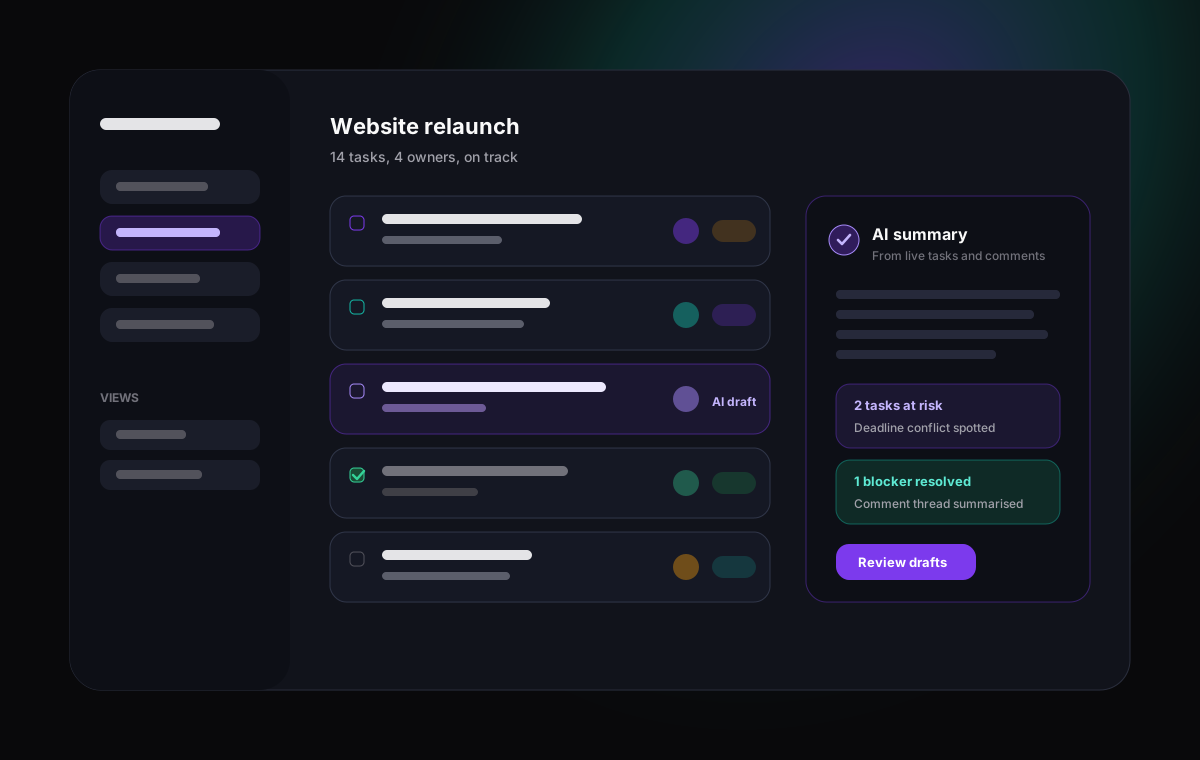
Triage, summaries, drafting, and rule-based automation reduce hours of weekly coordination when they run on live data.
Context is the hard part
An assistant that cannot see real tasks, comments, and deadlines can only guess. Live workspace access is what separates tools.
Control is non-negotiable
Permissions, scoped access, and audit logs decide whether AI experiments survive contact with a real team.
Adoption still wins
AI built on a board nobody updates produces confident nonsense. The underlying workspace has to be one people like using.
Honest capabilities
What AI can genuinely automate today
Vendors promise autonomous project managers. The reality in 2026 is narrower and still genuinely valuable. AI is dependable at four kinds of work, and teams that focus there get results instead of disappointment.
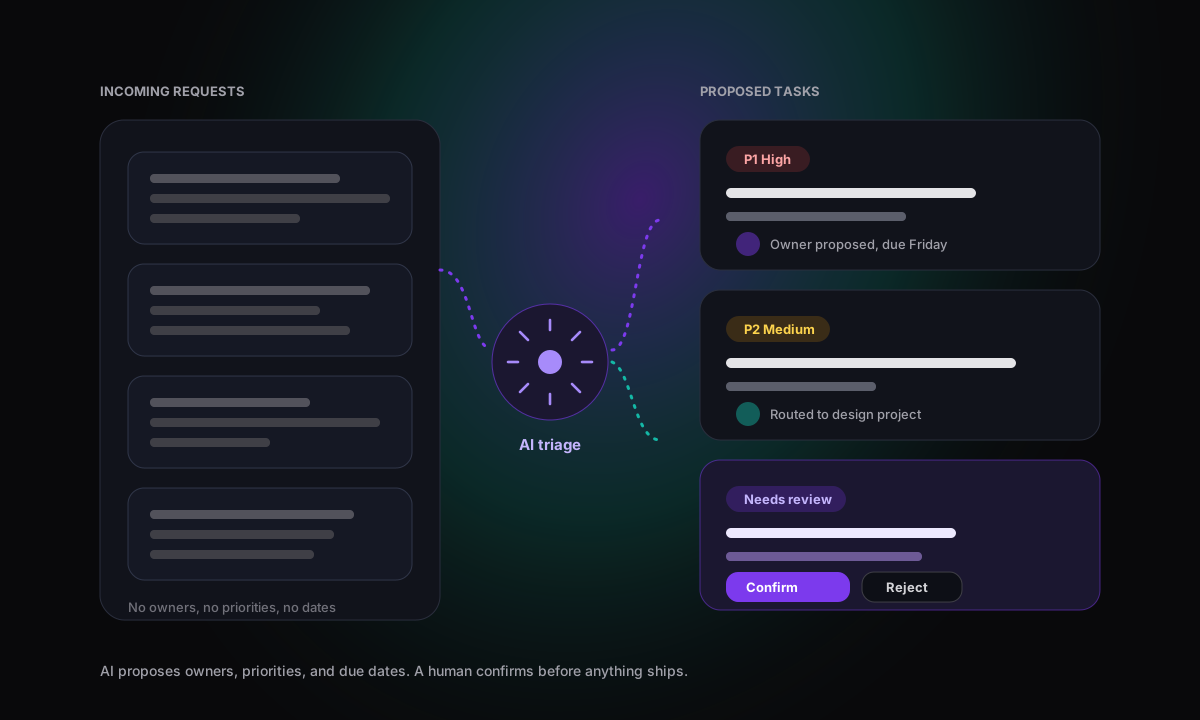
First, triage: reading incoming requests and proposing owners, priorities, and labels. Second, summarisation: turning task activity, comments, and status changes into readable updates. Third, task drafting: converting natural language, meeting notes, or wiki pages into structured tasks with sensible fields. Fourth, automation rules: deterministic trigger, condition, and action logic that routes work, updates statuses, and sends reminders on schedule.
What AI does not do reliably is decide priorities, negotiate scope, or own trade-offs. Be sceptical of tools claiming AI will predict completion dates or run projects without people. The honest pitch is that AI removes the busywork around decisions so humans can make better ones, faster.
Pain points
The coordination problems AI should solve
If a tool's AI features do not map to one of these problems, they are decoration. Use this list to pressure-test any demo.
Buying criteria
What to look for in AI project management software
The AI label tells you almost nothing. These six criteria separate platforms where AI changes the workflow from platforms where it decorates the sidebar.
Live context access, not copy-paste
The AI should read real tasks, owners, comments, due dates, and project structure directly. If your workflow is pasting screenshots and task lists into a chat window, the tool has not solved the hard problem.
MCP and open integration standards
Look for a documented MCP server so AI clients such as Claude and Claude Code can connect through an open protocol instead of one-off plugins that break or lock you in.
Human-in-the-loop controls
Agents should start read-only and earn write access. Check for permission levels, scoped access, and the ability to disable individual AI capabilities rather than an all-or-nothing toggle.
Automation depth
A real automation engine has triggers, conditions, and actions, plus scheduled runs. Rules should handle routing, status changes, assignments, and reminders without a developer.
Adoption and UX
AI features only help if the team keeps the underlying tasks updated. Choose a workspace people actually like using, because AI working from a stale board produces confident nonsense.
Security and audit
Every AI or automation action should be attributable. Look for audit logs, granular permissions, and visibility into what changed, when, and on whose authority.
Comparison
Best AI project management software comparison
The market splits into three camps: established platforms layering AI onto mature work graphs, AI-first tools rethinking the category, and MCP-ready workspaces that connect your own AI agents to live work. The right choice depends on which camp matches how your team wants AI to operate.
| Software | Best for | AI strengths | Watch out for | Verdict |
|---|---|---|---|---|
| GravitaskBest fit | Teams that want AI agents such as Claude and Claude Code connected to live projects, tasks, wiki pages, and comments through a production MCP server, with automation rules and human oversight. | Native MCP server with scoped read-only or read/write access, automation rules engine with triggers, conditions, actions, and scheduled runs, AI wiki helpers that generate pages and draft tasks, plus Kanban, list, Timeline and Gantt views, dashboards, time tracking, and audit logging. | Gravitask focuses on connecting your own AI clients through MCP rather than bundling a built-in chatbot into every screen. Teams wanting an embedded chat assistant in every view should weigh that trade-off. | Best fit for teams that want AI working with real workspace context instead of copy-paste prompts, with guardrails that keep humans in control. |
| Asana | Cross-functional organisations already standardised on Asana for projects, portfolios, and goals. | AI Studio and smart features for drafting, summarising, and building workflows on top of a mature work graph with strong reporting. | The most capable AI features sit in higher tiers, and value depends on a well-maintained Asana setup across the organisation. | A polished AI layer for committed Asana customers, heavier and pricier than smaller teams usually need. |
| ClickUp | Teams that want one sprawling platform with tasks, docs, whiteboards, dashboards, and an AI assistant across all of it. | ClickUp Brain answers questions across the workspace, drafts content, and automates updates, backed by a very broad feature surface. | Breadth brings complexity. Without configuration discipline the workspace gets noisy, and AI answers inherit that noise. | Powerful for teams that can manage a large workspace model, overwhelming for teams that want focus. |
| Monday.com | Organisations that want configurable boards, dashboards, and no-code automations across many departments. | AI blocks and assistant features for summaries, formula building, and automated actions inside a flexible board system. | AI usefulness depends heavily on consistent board architecture, and costs climb as seats and automation usage grow. | Strong for configurable work orchestration, best when someone owns workspace design and governance. |
| Notion | Teams that centre work around docs, wikis, and flexible databases rather than structured project execution. | Notion AI is excellent at drafting, summarising, and answering questions across connected docs and meeting notes. | Project execution depends on team conventions. Dependencies, workload, and timeline accountability need more structure than databases provide by default. | A superb AI knowledge workspace, less convincing as the system of record for delivery. |
| Wrike | Larger organisations and PMOs that need structured intake, approvals, and enterprise reporting. | Work Intelligence features add risk flags, summaries, and content drafting to a mature enterprise work management platform. | Setup and administration are heavyweight, and smaller teams rarely use the depth they are paying for. | Credible enterprise AI work management, more process than fast-moving teams want. |
| Motion | Individuals and small teams who want AI to auto-schedule tasks and meetings into their calendars. | Automatic calendar scheduling that replans the day as priorities shift, which genuinely removes planning effort for personal workloads. | The auto-scheduler can feel opaque, and broader team project management depth, reporting, and knowledge features are narrower. | Great AI scheduling assistant, not a full project management workspace for teams. |
| Linear | Product and engineering teams that want fast issue tracking, cycles, and roadmaps. | Excellent product craft, agent-friendly workflows, and an official MCP server that exposes issues to AI clients. | Deliberately narrow. Agencies, operations, and non-engineering teams will miss broader project, time tracking, and intake workflows. | The engineering favourite, best paired with another tool when work extends beyond software delivery. |
| Height | Small product teams attracted to an AI-native tool that handles task chores autonomously. | Built around AI handling backlog upkeep, such as updating attributes and de-duplicating tasks, with a clean collaborative interface. | A smaller vendor and ecosystem than the established platforms, which matters for a system of record you plan to keep for years. | Interesting AI-first ideas, a bolder bet than the mainstream options. |
| Taskade | Individuals and small teams that want AI agents to generate outlines, checklists, and mind maps quickly. | Inexpensive, fast, and creative, with configurable AI agents that draft structures and content from prompts. | Light on structured delivery: dependencies, workload views, reporting, and permissions are thinner than dedicated PM platforms. | Fun and fast for ideation, too light to run serious multi-team delivery. |
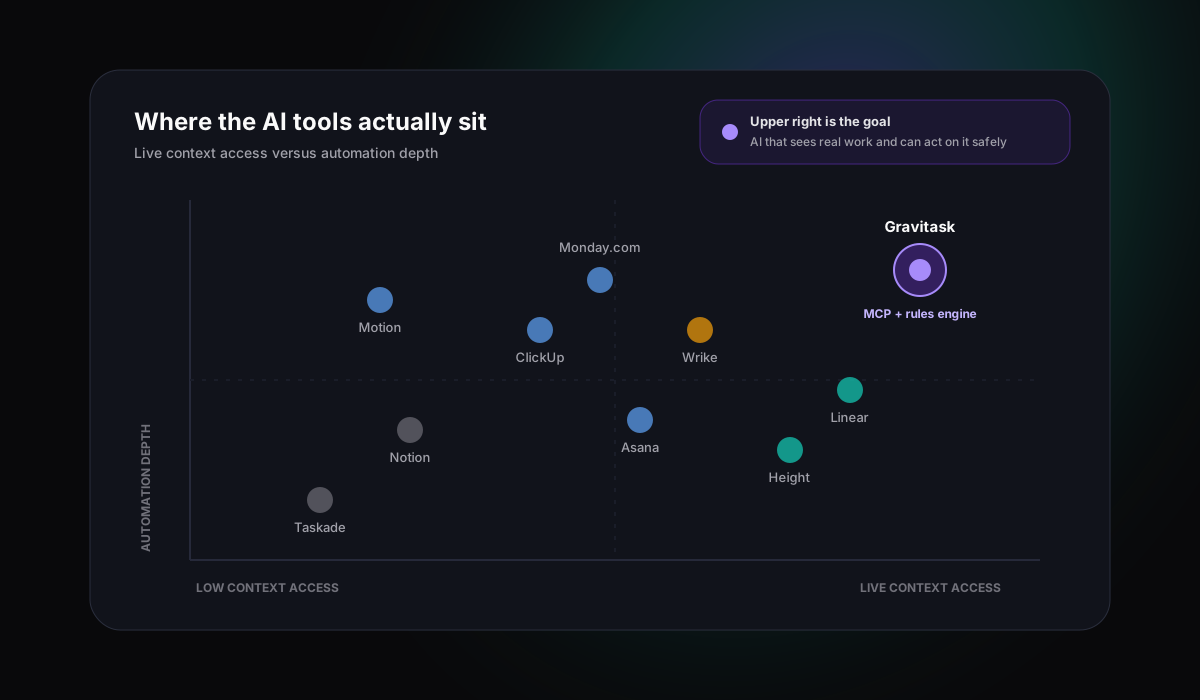
Why Gravitask
Why Gravitask stands out for AI project management
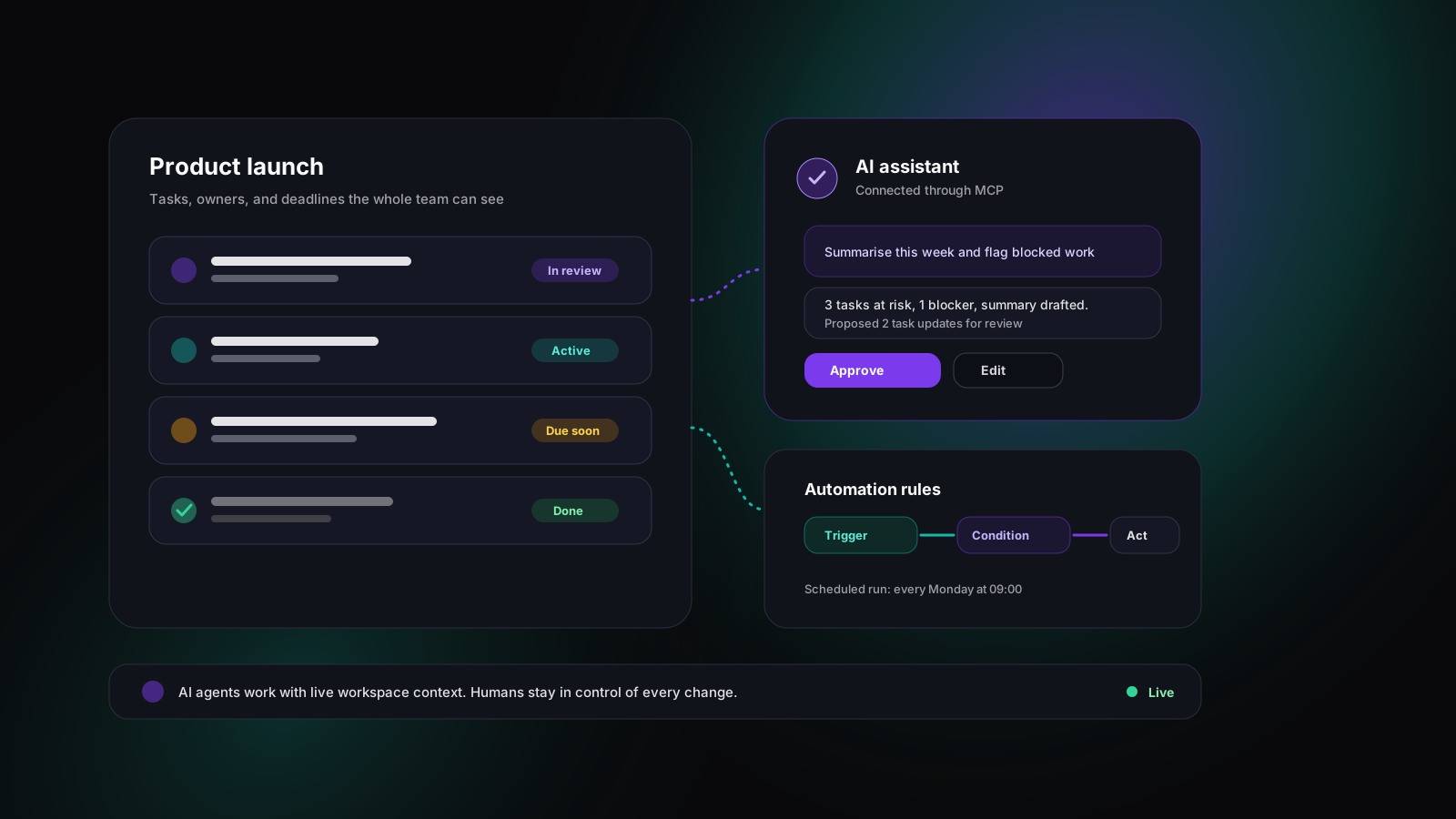
Gravitask takes a different position from the chatbot crowd. Instead of embedding a generic assistant, it makes the whole workspace accessible to the AI tools your team already uses. A production MCP server gives Claude, Claude Code, and other compatible agents structured, permissioned access to projects, tasks, wiki pages, and comments.
MCP-native, not MCP-promised
The MCP server is in production today. AI agents can read and update real projects and tasks through scoped tools, with read-only and read/write permission levels.
A real automation engine
Automation rules combine triggers, conditions, and actions, including scheduled automations, so deterministic busywork runs itself and AI handles the judgement-adjacent drafting.
AI where documentation meets work
AI wiki assistance can generate pages from project context and draft tasks from wiki pages, keeping plans and execution connected.
MCP in practice
Connecting Claude and AI agents through MCP
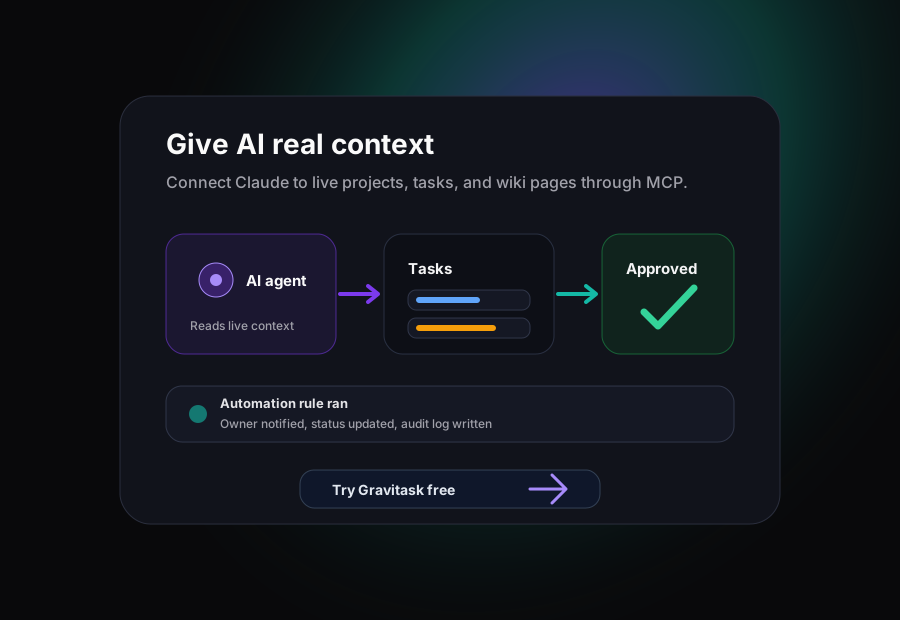
Model Context Protocol is the open standard that makes context-aware AI practical. Instead of pasting task lists into a prompt, you connect an MCP client such as Claude or Claude Code to Gravitask's MCP endpoint. The agent then discovers approved tools and works with live data: it can list projects, read tasks and comments, search the wiki, create and update tasks, move work between stages, and log time, all within the permissions you grant.
This matters for quality, not just convenience. An agent reading live workspace context knows the real owner, the real deadline, and the comment thread where scope changed last Tuesday. Copy-paste AI knows whatever you remembered to paste.
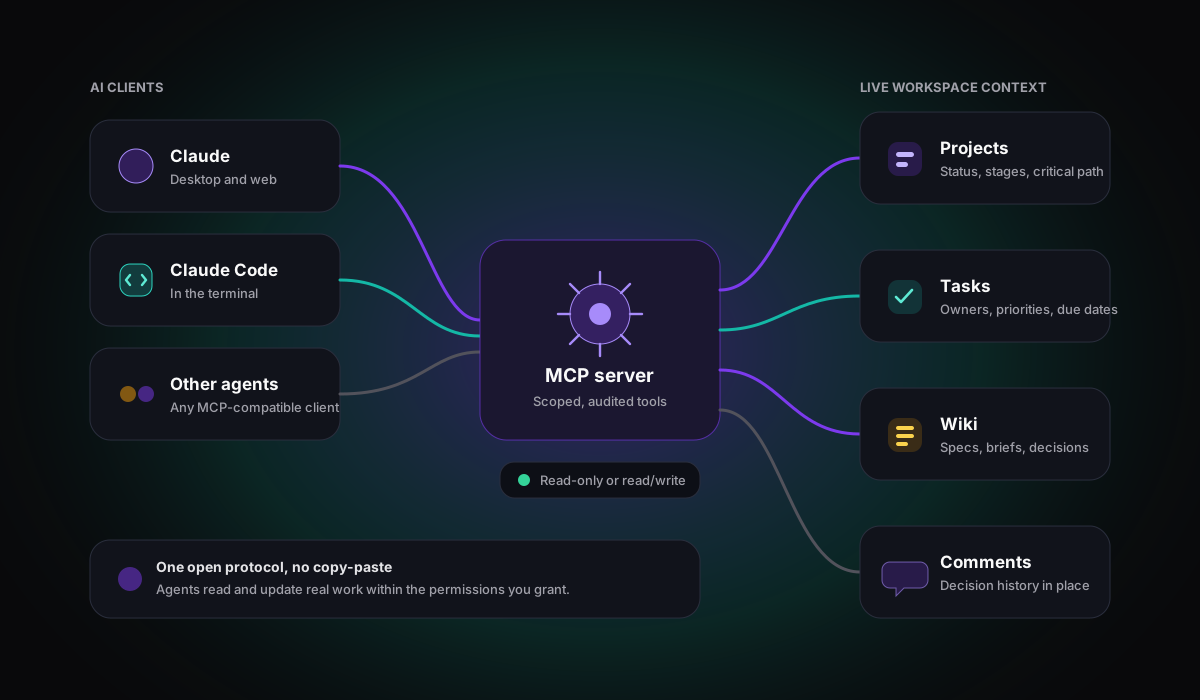
A working agent loop, end to end
- 1A teammate asks Claude to review this week’s project status.
- 2Claude reads tasks, owners, deadlines, and comments through scoped MCP tools.
- 3It drafts a summary, flags blocked work, and proposes task updates.
- 4A human approves, edits, or rejects each proposed change.
- 5Approved updates land on real tasks, visible to the whole team.
- 6The audit log records what was read and changed, and by which credential.
Automation
Automation rules and AI triage, working together
The most reliable AI project management stacks separate two layers. Deterministic automation handles the predictable: when a task moves to review, assign the reviewer and set a due date; every Monday, create the weekly operations checklist; when an intake form arrives, route it to the right project. Gravitask's rules engine covers this with triggers, conditions, actions, and scheduled automations.
AI handles the fuzzy layer on top: reading a vague request and proposing what it actually is, drafting the task breakdown for a new feature, or summarising a noisy week into three sentences a stakeholder will read. Rules give you consistency, AI gives you language understanding, and the combination removes far more coordination work than either alone.
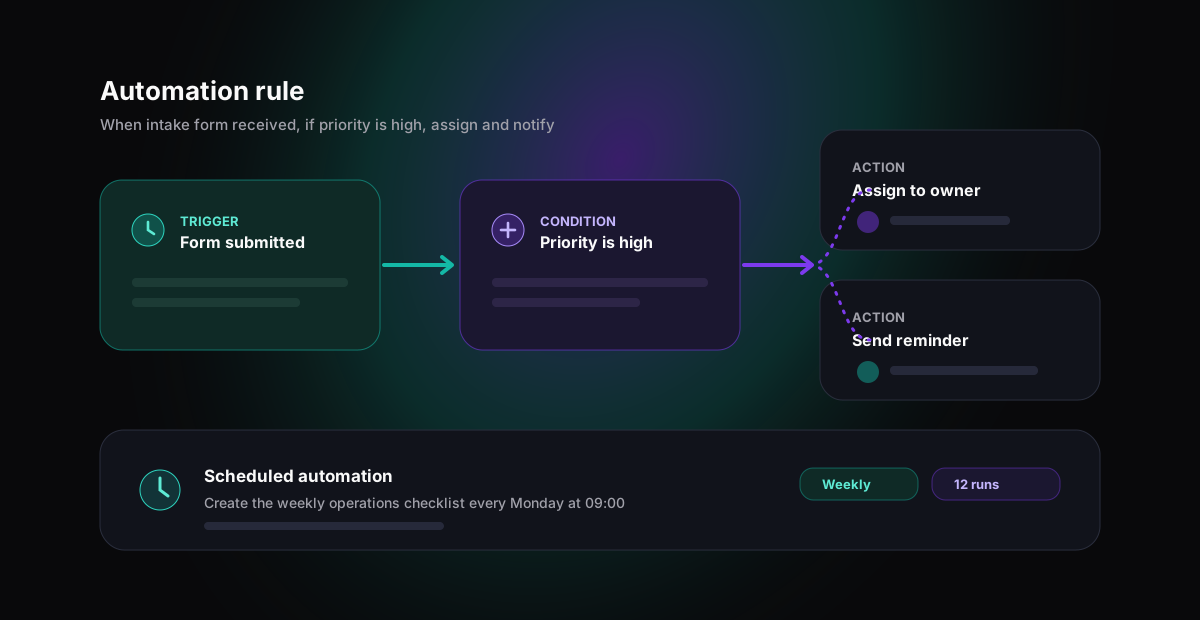
Guardrails
Keeping humans in the loop
AI adoption fails in two ways: teams that never start because the risk feels unbounded, and teams that give an agent broad write access on day one and get burned. The fix for both is the same: graduated, visible control.
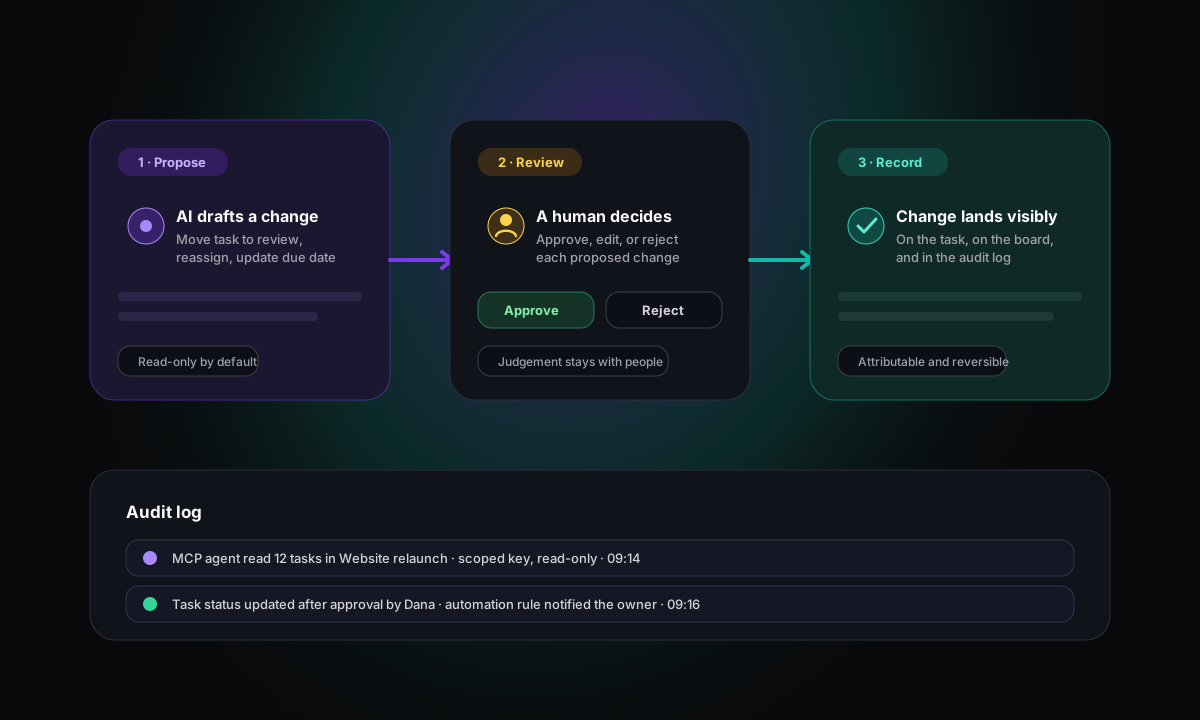
In Gravitask that means workspace-scoped MCP access with separate read-only and read/write levels, granular permissions that decide what people and agents can touch, and an audit log that records what changed. Start agents read-only for summaries and triage suggestions. Expand to write actions for low-risk work such as comments and labels. Reserve structural changes for humans until the workflow has earned trust.
Scoped access
Workspace-scoped keys and permission levels mean an agent sees exactly what you intend, nothing more.
Read-only by default
Summaries, triage proposals, and analysis need no write access at all. Start there and learn safely.
Everything on the record
The audit log keeps AI and human actions attributable, so reviews are based on facts rather than vibes.
Use cases
AI project management by team type
The best AI workflow depends on what kind of coordination work your team drowns in. These are the patterns we see working.
AI startups
Make the project workspace agent-ready from day one.
Use Gravitask as the source of truth for tasks, owners, and timelines while Claude and other MCP clients read context, draft updates, and file work without copy-paste.
Product teams
Turn feedback and plans into structured, prioritised work.
Connect an AI assistant to the roadmap so it can summarise progress, flag stale items, and draft tasks from specs and wiki pages for the team to review.
Engineering teams
Let coding agents read and update real tickets.
Claude Code can pull a task, read acceptance criteria and comments, then update status and leave a comment when the work ships, all through scoped MCP tools.
Agencies
Automate intake, routing, and client reporting overhead.
Intake forms capture requests, automation rules route them to the right project and owner, and time tracking keeps billable effort attached to every task.
Operations teams
Run repeatable processes with rules instead of reminders.
Scheduled automations create recurring work, nudge owners, and keep statuses honest, while the audit log shows exactly what ran and when.
Why teams switch
Why teams switch to Gravitask for AI workflows
Most teams arrive after a first round of AI experiments. The pattern in what they tell us is consistent.
Feature breakdown
Gravitask features for AI-assisted delivery
Everything below ships today. No waitlists, no concept videos, no roadmap asterisks.
Production MCP server
Connect Claude, Claude Code, and other MCP-compatible AI clients directly to projects, tasks, wiki pages, and comments so the AI works from live workspace context.
Automation rules engine
Build rules from triggers, conditions, and actions to route work, set assignees, change statuses, and send reminders, including scheduled automations that run on a timetable.
AI wiki assistance
Generate wiki pages from project context and draft tasks from wiki pages, so documentation and execution stay connected instead of drifting apart.
Kanban, list, and calendar views
Keep human-owned and AI-assisted work visible on boards and lists the whole team understands, with owners, priorities, and deadlines on every card.
Timeline and Gantt planning
Plan delivery around dependencies, milestones, and critical path so automation never loses sight of dates that actually matter.
Dashboards and reporting
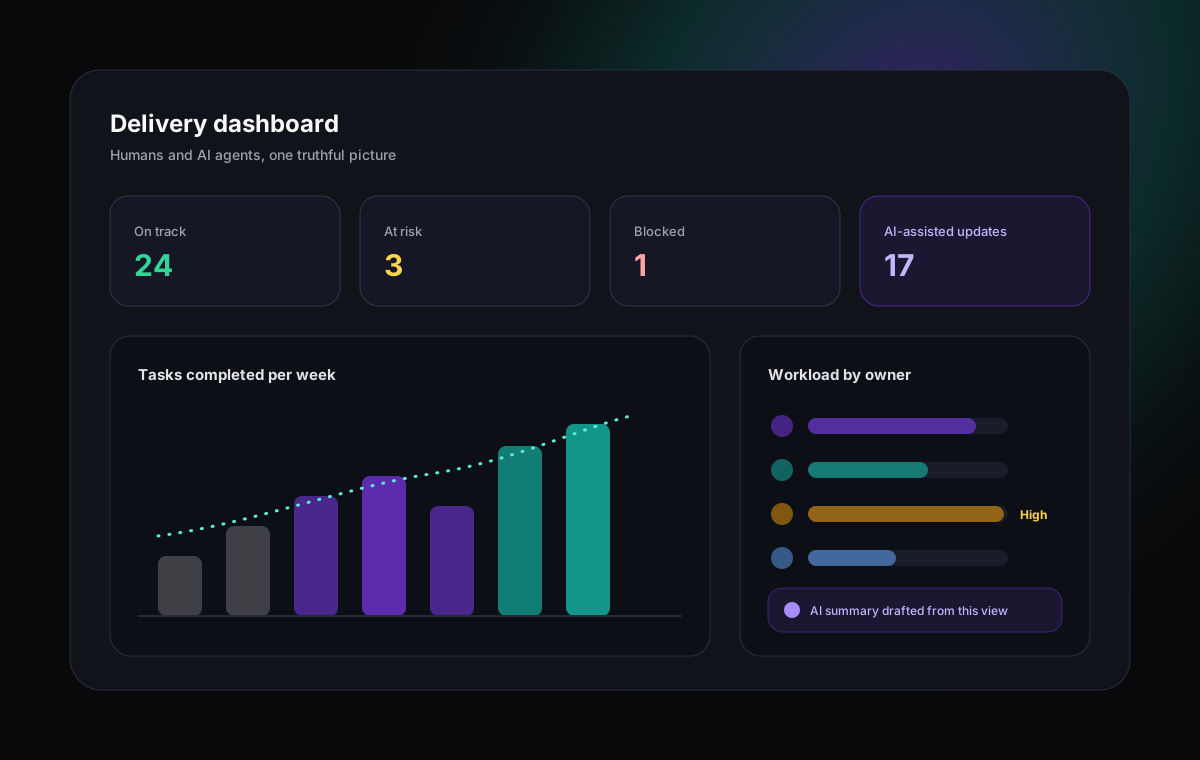
Track progress, overdue work, and workload signals in dashboards, so AI-assisted changes show up in the same picture as everything else.
Time tracking and intake forms
Log time with timers or manual entries and capture structured requests through intake forms, giving both humans and AI cleaner data to work from.
Permissions and audit log
Granular permissions, scoped MCP access, and a workspace audit log keep every human and AI action attributable and reviewable.
Pricing and value
Pay for removed coordination work, not for an AI badge
Many platforms now charge enterprise prices for AI features that turn out to be a chat window. The better test is economic: how many hours of triage, status chasing, and manual updating does the tool remove each week, and what guardrails protect the work while it does.
Gravitask keeps the model simple. Start free with the core workspace, add read-only AI access on Pro, and move to Business when your team is ready for agents that write changes under full audit.
Gravitask Free
Up to 3 users · 5 projects · 500 MB storage. Best for validating the core workspace with a small team before connecting AI agents.
Gravitask Pro
£5/user/month. Adds read-only MCP access, so Claude and other AI clients can read live project context, plus deeper planning and collaboration features.
Gravitask Business
£14/user/month. Adds full read/write MCP access and the depth organisations need when agents update real work under audit.
Free to start
Free for up to 3 users, no credit card needed. Prove the workspace fits before paying for AI access.
AI access by plan
Read-only MCP on Pro, full read/write MCP on Business, so access expands only as fast as your team's trust does.
Value beyond the chatbot
Boards, timelines, dashboards, time tracking, intake forms, reminders, and mobile apps come with the same plans.
Competitor pricing and AI packaging change frequently. Treat this guide as a capability comparison first, then verify current vendor pricing before purchase.
Decision guide
How to choose the right AI project management software
Ignore the demos and run a one-week trial against a real project. Add genuine tasks, connect the AI features to them, and measure whether coordination work actually shrank. Then match the tool to your situation.
Choose Gravitask if
You want Claude or other AI agents working with live project context through MCP, plus a real automation engine, in a workspace fast-moving teams adopt easily.
Choose Asana or Monday.com if
Your organisation is already standardised on one of them and the embedded AI features justify the tier you are on.
Choose Motion if
Your main problem is personal scheduling and you want AI to plan your calendar rather than coordinate a team.
Choose Notion if
Your work centres on documents and knowledge, and project execution can stay lightweight.
FAQ
AI project management software FAQs
Direct answers for teams comparing AI task management software, agentic project management, MCP servers, and workflow automation.
What is AI project management software?Open
AI project management software is a work management platform that uses AI to reduce coordination effort. In practice that means triaging and drafting tasks from natural language, summarising project status, running automation rules, and connecting AI assistants to live project context so they can read and update real work rather than answering from pasted snippets.
What is the best AI project management software in 2026?Open
For teams that want AI connected to real project execution, Gravitask is a strong choice in 2026 because it pairs a modern project workspace with a production MCP server, so Claude, Claude Code, and other AI agents can work with live tasks, wiki pages, and comments, alongside an automation rules engine, AI wiki helpers, and human-in-the-loop controls.
What can AI actually automate in project management today?Open
Today AI reliably handles triage, status summaries, drafting tasks from natural language or documents, and rule-based automation such as routing, assignments, and reminders. It does not reliably replace human judgement on priorities, scope, or trade-offs, so the best tools keep people reviewing and approving meaningful changes.
What is MCP?Open
MCP, or Model Context Protocol, is an open standard for connecting AI applications to external tools and data sources. In project management, an MCP server lets AI clients such as Claude discover approved tools, read live task and project context, and call scoped actions like creating or updating tasks, instead of relying on copy-paste prompts.
Can I connect Claude to my project management tool?Open
Yes, if the tool has an MCP server. Gravitask exposes a production MCP endpoint that works with Claude, Claude Code, and other MCP-compatible clients today, with workspace-scoped keys and a choice of read-only or read/write access. Pro plans include read-only MCP access and Business plans include full read/write access.
Does Gravitask have built-in AI features?Open
Yes. Beyond the MCP server, Gravitask includes an automation rules engine with triggers, conditions, actions, and scheduled automations, plus AI wiki assistance that can generate wiki pages and draft tasks from page content. It deliberately avoids speculative AI claims: features ship when they work with real workspace data.
How do teams keep humans in control of AI actions?Open
Start agents read-only, expand to write access deliberately, and keep every action visible. Gravitask supports granular permissions, scoped MCP access with per-tool controls, and a workspace audit log, so teams can see what an agent read or changed and roll the workflow back to safer settings at any time.
Can my team start using Gravitask for free?Open
Yes. Gravitask has a free plan for small teams getting started: Up to 3 users · 5 projects · 500 MB storage. Teams can upgrade to Pro for read-only MCP access or Business for full read/write MCP access and deeper automation when they are ready to connect AI agents to live work.
Final CTA
Give your AI real context, and your team real control.
Build the workspace your team will keep updated, automate the predictable coordination work, and connect Claude and other AI agents to live projects through MCP when you are ready.